WifiScanneren1.3.149.40585
Publisher Description


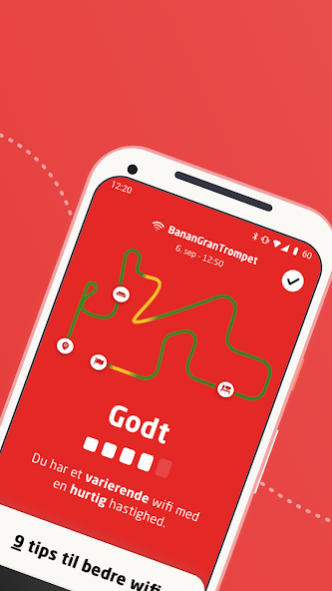

With the Wifi scanner, you can even scan your home for strong and weak wifi zones and get tips on how to improve your wifi. You can easily use the app even if you are not a customer at Stofa. But if you have broadband at Stofa, we adapt the advice to suit your Stofa modem and its options.
With Stofa WifiScanner you can measure the quality of your wifi, and you immediately see if your wifi is good, less good or bad. You just open the app on your smartphone and give it a tour of your home. Along the way you can mark which room you are in - then you have a good overview of your route. The color of the route shows the app's assessment of your wifi.
We only use the camera to map your scan. The images are therefore neither recorded nor saved.
NOTE - If you get an error while trying to download the WifiScan, you must first install the official AR app from Google, called "ARCore by Google", then install the WifiScan. We are working to improve this.
You are very welcome to send us ideas, tips and feedback to us under the menu item "Give feedback" in the app.
Privacy Policy: https://stofa.dk/personinformation
About WifiScanneren
The company that develops WifiScanneren is Stofa. The latest version released by its developer is 1.3.149.40585.
To install WifiScanneren on your Android device, just click the green Continue To App button above to start the installation process. The app is listed on our website since 2023-06-19 and was downloaded 5 times. We have already checked if the download link is safe, however for your own protection we recommend that you scan the downloaded app with your antivirus. Your antivirus may detect the WifiScanneren as malware as malware if the download link to dk.stofa.wifiscanneren is broken.
How to install WifiScanneren on your Android device:
- Click on the Continue To App button on our website. This will redirect you to Google Play.
- Once the WifiScanneren is shown in the Google Play listing of your Android device, you can start its download and installation. Tap on the Install button located below the search bar and to the right of the app icon.
- A pop-up window with the permissions required by WifiScanneren will be shown. Click on Accept to continue the process.
- WifiScanneren will be downloaded onto your device, displaying a progress. Once the download completes, the installation will start and you'll get a notification after the installation is finished.
Program Details
System requirements
Download information
Pricing
Version History
version 1.3.149.40585
posted on 2023-06-19
- Appen bliver lukket d. 12 september
version 1.3.139.40271
posted on 2021-06-30
Justeringer så app’en overholder de glædende krav jf. Googles politikker
